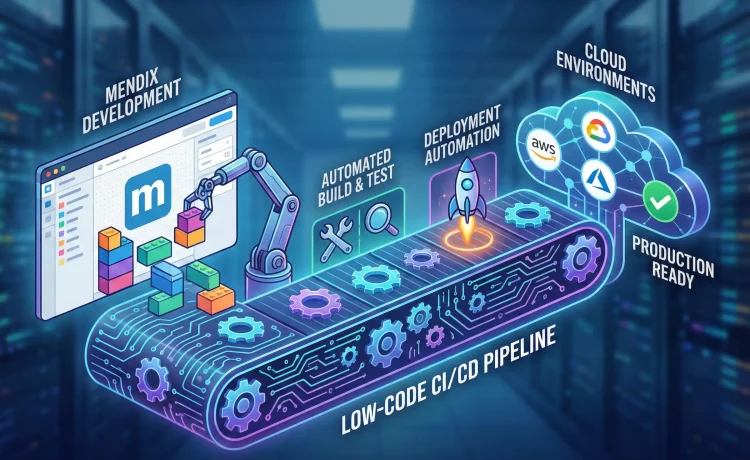
Jenkins, GitHub Actions & Mendix API-based Deployment Automation**
As enterprises accelerate digital transformation, the need for rapid application delivery becomes more urgent. Traditional development often struggles to keep pace with business demands—lengthy release cycles, manual handoffs, and unpredictable deployment quality. Low-code platforms like Mendix solve the development speed challenge, but to achieve true enterprise agility, development speed must pair with equally fast and reliable deployment automation.
This is where CI/CD pipelines come in. When integrated with Mendix, CI/CD ensures that every change—from a small UI tweak to a major feature enhancement—moves from development to testing, and finally into production, with minimal manual intervention. And by leveraging automation tools such as Jenkins, GitHub Actions, and Mendix’s APIs, organizations can deliver high-quality applications consistently across modern cloud environments.
This guide explores how CI/CD works in a Mendix ecosystem, why automation matters, and how organizations can implement stable, scalable, and secure deployment pipelines.
Why Low-Code CI/CD Matters More Than Ever
Low-code is designed for rapid delivery, but without automation, even the fastest development cycles can hit friction in deployment. Common issues include:
- Manual packaging and versioning errors
- Environment inconsistencies
- Slow deployment approvals
- Lack of standardized testing
- Difficulty scaling deployments across multiple cloud platforms
CI/CD solves these problems by enabling:
1. Continuous Integration (CI)
Every commit triggers automated versioning, testing, validation, and build steps. Collaboration becomes seamless, even across large teams.
2. Continuous Delivery (CD)
Validated builds are automatically deployed to test, acceptance, or production environments based on rules and approvals.
3. Predictability & Repeatability
Automated pipelines remove variances caused by human intervention.
4. Faster Time-to-Market
When deployments happen in minutes instead of days, organizations can innovate continuously.
5. Stronger Governance
Every deployment is logged, traceable, and aligned with organizational policies—critical for regulated industries.
With Mendix, these CI/CD principles blend seamlessly into the platform’s architecture through APIs, deployment packages, and version control integration.
Understanding CI/CD in the Mendix Ecosystem
Mendix provides built-in tools that make automation easier:
✔ Mendix Deploy API
For programmatically building, uploading, and deploying app packages.
✔ Mendix Pipelines (MxBuild)
The build tool used to generate deployable packages outside the Studio Pro interface.
✔ Version Control Integration (Git)
New Mendix versions fully support Git-based repositories, opening the door to automation with industry-standard CI tools.
✔ Cloud-native Deployment Targets
Mendix apps can be deployed to Mendix Cloud, AWS, Azure, Kubernetes, hybrid cloud environments, and more.
These capabilities make Mendix uniquely suitable for enterprise-level CI/CD automation.
Setting Up Automated Pipelines with Jenkins
Jenkins, a long-standing leader in CI/CD, is widely used by enterprises due to its plugin ecosystem and scalability.
Step 1: Connect Jenkins with Mendix Git Repository
Jenkins pulls code from Mendix’s Git-based repository. Every commit or pull request can trigger a build automatically.
Step 2: Use Mendix Build Tools
A typical Jenkins pipeline involves:
- Cloning the repository
- Running MxBuild via a command-line interface
- Generating a deployment package (.mda or .mxbuild)
- Storing artifacts
- Calling Mendix Deploy API for deployment
Step 3: Automated Testing
Businesses can integrate:
- Unit tests
- API tests
- Selenium UI tests
- Security checks
- Performance tests
Step 4: Deployment via Mendix API
Jenkins can push the package into any target environment (e.g., Mendix Cloud, Azure Kubernetes Service) using:
- Create package endpoints
- Start deployment
- Manage environment variables
- Trigger database synchronization
Step 5: Notifications & Governance
Notifications can be routed to Slack, Teams, or email for:
- Build results
- Deployment approvals
- Rollback triggers
Jenkins remains a powerful option for enterprises with established DevOps ecosystems.
GitHub Actions: A Modern & Lightweight Way to Automate Mendix Deployments
As more teams rely on GitHub for code collaboration, GitHub Actions has become an appealing CI/CD option. It is cloud-native, easy to configure, and integrates beautifully with Git-based Mendix projects.
Why Use GitHub Actions for Mendix?
- No server maintenance
- Faster configuration
- Better alignment with Git workflows
- Reusable workflows across repositories
Sample GitHub Actions Workflow for Mendix
A typical GitHub Actions process includes:
- Trigger on push or pull request
- Checkout repository
- Run MxBuild to generate package
- Upload build artifact
- Use Mendix Deploy API to deploy to an environment
- Run post-deployment smoke tests
Secrets & Security
GitHub Actions integrates secret management for:
- Mendix API keys
- Cloud credentials
- Database and runtime configuration
This ensures deployments remain secure at every step.
Scalability Across Cloud Environments
GitHub Actions workflows can deploy Mendix apps to:
- Mendix Cloud
- AWS Elastic Kubernetes Service
- Azure Kubernetes Service
- Private cloud clusters
This makes GitHub Actions a compelling modern CI/CD option for Mendix teams adopting cloud-native architectures.
Mendix API-Based Deployment: Full Automation Without DevOps Platform Lock-In
While tools like Jenkins and GitHub Actions manage the pipeline, Mendix Deploy API handles the deployment logic itself.
With the API, teams can:
✔ Create app packages (programmatically)
This is ideal for automated nightly builds or integration testing.
✔ Upload packages to environments
Whether it’s test, acceptance, or production.
✔ Configure application settings
Including constants, environment variables, logging, and runtime settings.
✔ Trigger start/stop of environments
Allowing zero-downtime deployment strategies.
✔ Integrate with any CI/CD platform
Teams can use Azure DevOps, GitLab CI, CircleCI, Bitbucket Pipelines, or custom automation scripts.
API-driven deployment ensures total flexibility—critical for large enterprises managing multi-cloud architectures.
CI/CD for Mendix in Cloud Environments
Mendix applications often run in:
- Mendix Cloud
- AWS
- Azure
- Kubernetes clusters
- Hybrid on-prem + cloud environments
Each environment has its own deployment patterns, secrets management, and scalability considerations.
CI/CD pipelines can automate:
1. Infrastructure Provisioning
Via Terraform or cloud-native resources.
2. Deployment Execution
Automated package upload and environment promotion.
3. Horizontal & Vertical Scaling
Using Kubernetes or Mendix Cloud scaling APIs.
4. Continuous Monitoring
Integration with:
- AWS CloudWatch
- Azure Monitor
- Datadog
- Mendix’s own Application Quality Monitor
CI/CD ensures deployments are not only fast—but also reliable and observable.
Quality Assurance in Low-Code CI/CD
Automation is not just about deployments—it’s about quality.
Include Automated Tests
Mendix supports:
- UI tests (via ATS or Selenium)
- Unit tests for microflows
- API testing
- Integration testing
Use Static Analysis & Quality Scans
Integrate tools like:
- Mendix Application Quality Monitor
- Checkmarx
- SonarQube
- Snyk
Automate Release Management
Feature flags and approval gates help manage enterprise governance.
How We LowCode Helps Organizations Implement Automated CI/CD for Mendix
At We LowCode, we work across industries to help enterprises build highly scalable, automated, and secure Mendix delivery pipelines. Our team combines DevOps best practices with deep platform expertise to design CI/CD ecosystems optimized for your cloud environment—be it AWS, Azure, Kubernetes, or Mendix Cloud.
Whether you need pipeline setup, cloud-native architecture design, or Mendix application modernization, our experts ensure your delivery process is seamless, predictable, and fully automated. As a trusted Mendix Consultant team, we transform complex deployments into streamlined, low-touch, DevOps-driven workflows.
The Role of a Professional Mendix Consultant in CI/CD Success
Enterprises often underestimate the complexity of building a robust deployment pipeline. A skilled Mendix Consultant brings clarity, structure, and governance to the process. They ensure:
- Proper environment strategy (DTAP)
- API-based automation is implemented correctly
- Security best practices are enforced
- Deployment performance is optimized
- Cloud targets are configured efficiently
A consultant also ensures that Mendix Development Services include proper CI/CD practices from day one, not as an afterthought.
Mendix Development Services: Beyond Just Building Apps
True digital transformation requires more than rapid app development. Mendix Development Services today include:
- Automated testing
- Agile delivery processes
- Continuous integration and deployment
- Performance optimization
- Cloud-native configuration
- Observability and monitoring
By integrating CI/CD into a Mendix development strategy, organizations gain:
- Higher release velocity
- Reduced deployment risk
- Better application reliability
- Stronger governance and compliance
- A predictable innovation pipeline
Low-code becomes not just a development accelerator—but a full enterprise delivery engine.
Best Practices for Low-Code CI/CD with Mendix
Here are the top recommendations for organizations adopting Mendix CI/CD:
1. Start with Version Control Discipline
Use Git workflows (branching, pull requests, reviews).
2. Standardize DTAP Environments
Ensure consistent configurations across development, test, acceptance, and production.
3. Automate Everything
Build → Test → Deploy → Verify → Monitor
4. Keep Pipelines Modular
Allows upgrades, reusability, and scalability across applications.
5. Use API-Driven Deployment
Avoid manual cloud console changes.
6. Build a Security-First Pipeline
Include static scans, secret rotation, and automated compliance checks.
7. Integrate with Cloud-Native Tooling
Monitoring, scaling, and resource management tools must be part of the pipeline.
8. Use Feature Flags for Controlled Releases
Safer rollout of features without risk.
9. Invest in Developer & Citizen Developer Training
CI/CD literacy must extend beyond technical DevOps teams.
10. Continuously Optimize
CI/CD is a living system—monitor metrics, reduce bottlenecks, and evolve over time.
Conclusion: The Future of Mendix Lies in Automated, Cloud-Driven Pipelines
As organizations embrace low-code platforms like Mendix, the need for modern, automated, cloud-ready CI/CD pipelines becomes unavoidable. Whether using Jenkins for enterprise stability, GitHub Actions for modern DevOps workflows, or Mendix APIs for complete customization—automation ensures that innovation never slows down.
By combining the power of Mendix with well-architected CI/CD pipelines, organizations can deliver applications faster, more securely, and with higher quality. And with the right Mendix Consultant or a dedicated Mendix Development Services partner like We LowCode, enterprises can achieve true digital agility—transforming ideas into real, production-ready solutions at unprecedented speed.